Microsoft 365 mailbox storage limits vary depending on the license assigned to a user. For small and medium-sized businesses (SMBs), Business plans have traditionally provided a 50 GB primary mailbox quota. As email volumes continue to grow, this limit can become restrictive for users who rely heavily on email for day-to-day business communication.
To give Business users more room for email storage, Microsoft is providing an additional 50 GB of primary mailbox storage. This brings the supported mailbox quota to a maximum of 100 GB, in line with the storage capacity available to enterprise users.
In this blog, we’ll look at how the additional 50 GB of storage is being allocated and how it affects mailbox storage limits.
What the 100 GB Mailbox Entitlement Means for M365 Business Suites?
The new 100 GB mailbox entitlement means that users with eligible Microsoft 365 Business licenses can now have up to 100 GB of primary mailbox storage, compared to the previous 50 GB limit. This increase is part of Microsoft’s 2026 Microsoft 365 packaging updates.
The additional 50 GB is included at no extra cost and applies to the following commercial plans:
- Microsoft 365 Business Basic
- Microsoft 365 Business Standard
- Microsoft 365 Business Premium
The updates are rolling out through September 2026.
How is the 100 GB Mailbox Quota Implemented?
The additional 50 GB is delivered through a new Exchange Online service plan called EXCHANGE_STORAGE_50GB. This service plan is added alongside the existing BPOS_S_STANDARD plan, which provides the original 50 GB mailbox storage.
For an eligible user to receive the full 100 GB primary mailbox quota, both service plans must be active. The new service plan effectively adds another 50 GB to the existing mailbox entitlement rather than replacing the original quota.
How to Verify the 100 GB Mailbox Limit for Microsoft 365 Business Users?
To confirm whether a Microsoft 365 Business user has received the new 100 GB mailbox limit, you can verify it at both the licensing and mailbox levels.
Check the User’s License in the Microsoft 365 Admin Center
To check whether the additional 50 GB storage is included in the user’s license, follow the steps below:
- Open the Microsoft 365 admin center.
- Navigate to Users > Active users. Select a user assigned a Microsoft 365 Business license to verify their mailbox storage.
- Open the Licenses and apps tab.
- Scroll down to the Apps section. You should see two Exchange-related services: Exchange Online (Plan 1) and Exchange Online Storage (50 GB Additional).
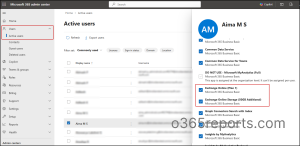
The presence of Exchange Online Storage (50 GB Additional) confirms that the additional 50 GB mailbox storage is included for the user.
Check the Storage Service Plan with Microsoft Graph PowerShell
Microsoft Graph PowerShell can be used to check whether the new EXCHANGE_STORAGE_50GB service plan has been assigned and provisioned. For that, first connect to Microsoft Graph PowerShell and run the following cmdlet:
|
1 2 3 4 |
$licenses = Get-MgUserLicenseDetail -UserId “user@contoso.com” $licenses.ServicePlans | Where-Object ServicePlanName -eq "EXCHANGE_STORAGE_50GB" | Select-Object ServicePlanName, ProvisioningStatus |
Replace “user@contoso.com” with the user’s mailbox address.

A ProvisioningStatus of Success confirms that the additional 50 GB storage has been successfully provisioned for the user.
To verify the new mailbox limit across multiple Microsoft 365 Business users, run the below script:
|
1 2 3 4 5 6 7 |
$users = Get-MgUser -All -Property UserPrincipalName foreach ($user in $users) { $licenses = Get-MgUserLicenseDetail -UserId $user.UserPrincipalName $licenses.ServicePlans | Where-Object ServicePlanName -eq "EXCHANGE_STORAGE_50GB" | Select-Object @{Name="User";Expression={$user.UserPrincipalName}}, ServicePlanName, ProvisioningStatus } |
This script checks all eligible users in the tenant and displays those with the EXCHANGE_STORAGE_50GB service plan along with its provisioning status.
Check Effective EXO Mailbox Quota Using PowerShell
You can confirm the mailbox’s effective storage limit directly in Exchange Online. First, connect to Exchange Online PowerShell and run the following cmdlet:
|
1 |
Get-Mailbox -Identity “user@contoso.com” | Format-List IssueWarningQuota, ProhibitSendQuota, ProhibitSendReceiveQuota, UseDatabaseQuotaDefaults |
Replace “user@contoso.com” with the user’s mailbox address.

Here, “ProhibitSendReceiveQuota” represents the effective primary mailbox quota (the hard quota limit). For example, an eligible Business user with the additional storage service plan may show an effective primary mailbox quota of 100 GB. If the mailbox also has separately assigned additional storage, the applicable additional quota can be checked separately based on the assigned license or add-on.
To check the effective quota for multiple mailboxes, run:
|
1 |
Get-Mailbox -ResultSize Unlimited | Select-Object UserPrincipalName, ProhibitSendReceiveQuota |
This returns the effective primary mailbox quota for all user mailboxes, allowing you to identify which mailboxes have the 100 GB limit.
Important Things to Know About the New 100 GB Mailbox Limit
The 100 GB primary mailbox entitlement comes with specific limitations around licensing, archiving, custom quotas, and shared mailboxes such as,
Multiple Licenses Do Not Increase the Quota
The 100 GB entitlement is the maximum effective primary mailbox quota for the eligible Business suite scenario. If a user has multiple licenses that provide Exchange mailbox entitlements, the quotas are not added together. Exchange applies the highest applicable entitlement.
For example: Suppose a user has both Microsoft 365 Business Premium and Office 365 E3. Business Premium now provides a 100 GB primary mailbox limit through the additional 50 GB storage service plan, while Office 365 E3 already includes a 100 GB primary mailbox. These quotas are not combined, so the user does not get 200 GB of mailbox storage. The effective primary mailbox quota remains 100 GB.
Exchange Online Archive Storage Remains Unchanged
The additional 50 GB applies only to the user’s primary mailbox. It does not increase the storage available in the user’s online archive mailbox or provide Exchange Online archiving capabilities.
This means administrators should treat the new 50 GB as an increase to the primary mailbox quota only, rather than as an overall increase in Exchange Online mailbox and archive storage.
The 100 GB Limit Does Not Override Custom Mailbox Quotas
If an administrator has configured a custom mailbox quota, the additional storage does not overwrite that setting. For example, if a user’s mailbox was manually reduced from 50 GB to 20 GB, it remains at 20 GB even after the additional 50 GB service plan is assigned.
Shared Mailbox Storage Follows Separate Quota Rules
The additional 50 GB entitlement is for eligible licensed users. It does not automatically increase the quota of shared mailboxes. Shared mailboxes follow their own Exchange Online licensing and quota rules.
The 100 GB Entitlement Applies Only to Eligible Business Suite Plans
The new 100 GB primary mailbox entitlement applies only to the Microsoft 365 Business suite plans specified in Microsoft’s announcement. It does not extend to other plans, such as Office 365 E1 or Exchange Online Plan 1.
Unexpected 150 GB Quotas May Appear Temporarily
Some tenants reported seeing a 150 GB primary mailbox quota for users with Microsoft 365 Business Basic or Business Standard and Exchange Online Plan 2. Microsoft confirmed that this behavior was not expected, identified the cause, and stated that a fix was being deployed.
Recommended Actions for Microsoft 365 Admins
Here are the key checks admins should perform after the new 100 GB mailbox entitlement takes effect:
- Review eligible users and verify that Microsoft 365 Business Basic, Business Standard, or Business Premium licenses have both BPOS_S_STANDARD and EXCHANGE_STORAGE_50GB enabled.
- Identify mailboxes nearing their current quota and verify the new limit before considering additional storage.
- Identify users assigned Exchange Online Plan 2 solely for the 100 GB mailbox quota and assess whether they still require its additional features before making licensing changes.
- Review custom mailbox quotas and increase them where the new 100 GB limit is needed.
- Update internal documentation and helpdesk guidance to reflect the new 100 GB primary mailbox limit.
Closing Thoughts
The 100 GB increase gives Microsoft 365 Business users more room for their primary mailboxes, but it is important to understand that 100 GB is the hard limit for primary mailbox storage. It cannot be increased further by purchasing additional storage, and the actual quota assigned to a user can still depend on their licensing configuration and any custom quota settings.
Understanding these rules will make it easier to verify the change and troubleshoot cases where the expected 100 GB quota does not appear.
Thanks for reading.