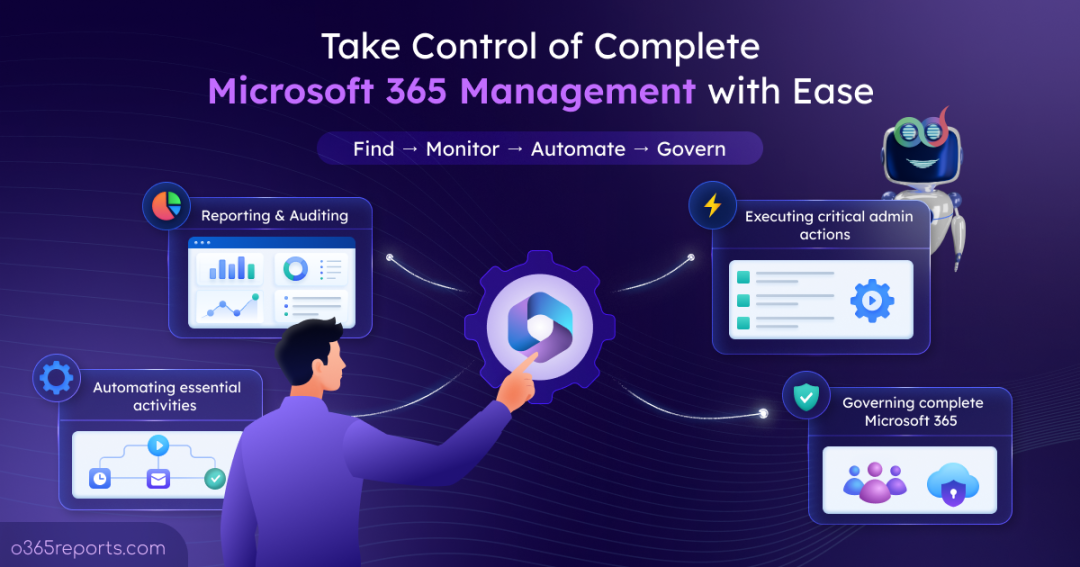
Managing Microsoft 365 isn’t usually a single complicated activity. It is a collection of smaller tasks that admins need to handle every day.
A user needs a license. A mailbox needs attention. Someone needs access to a SharePoint site. An alert needs to be investigated. As Microsoft 365 organizations grow, these everyday activities can become increasingly difficult to manage consistently.
Microsoft provides native tools for almost every Microsoft 365 administrative task. However, the real challenge is that a particular task or incident can involve a chain of actions. Admins may need to handle those actions across different admin centers and tools, which can take significant time and effort.
Let’s look at why managing these activities with native Microsoft 365 tools can become challenging in detail and explore the best alternative management approach.
Why is Managing Microsoft 365 Difficult with Native Tools?
Before a Microsoft 365 admin can make a change, they need to know exactly what needs to be changed. That sounds simple until you are dealing with thousands of users, hundreds of groups, multiple Teams and SharePoint sites, and activity spread across several M365 services.
Now, take a common Microsoft 365 request:
“Offboard a Microsoft 365 user from the organization”
Based on the organization’s offboarding process, the admin may need to update the user’s password, disable the user, cancel meetings, review their group memberships, convert the mailbox to shared mailbox, and handle other related resources.
There are two common native Microsoft approaches to offboard a user:
- Microsoft 365 Admin Centers: Admins can complete these tasks using the native admin centers. However, they may need to jump between multiple admin centers to offboard a user completely.
- Microsoft Graph PowerShell: PowerShell can connect multiple offboarding activities into a single workflow and automate repetitive steps. However, admins may need a ready-made PS script to offboard a user and track offboarding activities. Otherwise, they need to build the script from scratch, test, and execute it carefully.
Both approaches can handle the required tasks, but offboarding a user can still involve multiple steps and checks.
This is where a centralized Microsoft 365 management tools like AdminDroid can help bring these activities together and monitor the organization more efficiently.
Manage Microsoft 365 More Easily with AdminDroid
AdminDroid 365, a leading Microsoft 365 management tool that brings reporting and management capabilities together. So, admins can investigate their Microsoft 365 environment and perform supported administrative actions from a single console.
Its management capabilities cover major Microsoft 365 resources, including users, groups, mailboxes, Teams, channels, SharePoint, OneDrive, and other services.
But managing Microsoft 365 isn’t limited to a single action. Admins may be handling a user request in the morning, preparing a project workspace later, performing a bulk change in the afternoon, and reviewing a risky alert before the end of the day.
The following scenarios show how a AdminDroid Microsoft 365 management tool can help with different admin requirements.
- Manage Users, Groups, Teams, Mailboxes, and SharePoint Sites
- Automate Repetitive Microsoft 365 Activities with Workflows
- Keep Sensitive M365 Activities under Admin Approval
- Perform Bulk Microsoft 365 Admin Actions with More Control
- Delegate Microsoft 365 Administration with Right Level of Access
- Gain Complete Visibility with Microsoft 365 Reporting and Auditing
- Get Real-Time Alerts on Critical M365 Changes
- Stay on Top of Microsoft 365 Tasks with Reminders and Follow-ups
- Get 360-Degree Visibility into Microsoft 365 Environment
1. Manage Users, Groups, Teams, Mailboxes, and SharePoint Sites
Microsoft 365 administration involves more than managing user accounts. Admins may need to update group memberships, manage Teams and channels, configure mailboxes, maintain SharePoint sites, and handle changes across other Microsoft 365 resources.
With 450+ management actions, AdminDroid allows admins to perform critical lifecycle activities from its centralized management interface.
- User management actions: Create, update, enable, disable, delete, or restore users; assign licenses; manage MFA settings; and perform other user lifecycle tasks.
- Group management actions: Create groups, update memberships, manage group properties, set group expiration, and configure other group settings.
- Teams management actions: Manage Teams membership, permissions, guest access, and other Teams-related settings, along with channel management.
- Mailbox management actions: Configure mailbox delegation, manage email forwarding and out-of-office settings, and apply other mailbox configurations.
- SharePoint and OneDrive management actions: Create sites, manage access and sharing settings, and handle other supported site and OneDrive management tasks.
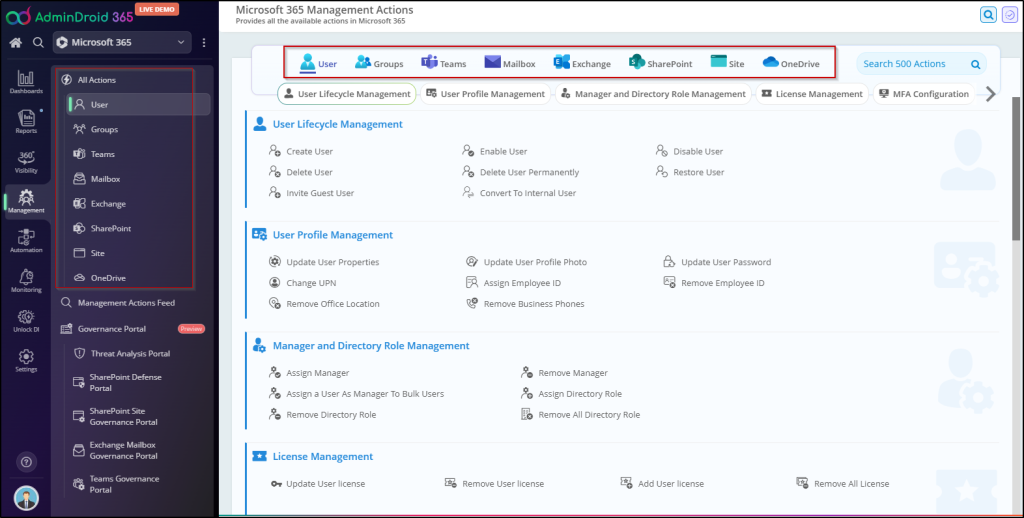
By bringing these management actions together, admins can complete related M365 changes more efficiently and spend less time repeating routine administrative steps.
2. Automate Repetitive Microsoft 365 Activities with Workflows
In M365 employee onboarding, admins create an account, assign licenses, add group memberships, configure collaboration resources, and notify relevant people. Repeating the same Microsoft 365 admin actions for every user can become time-consuming, especially when the process involves multiple actions across different resources.
AdminDroid provides automation with zero-code flow agents that allows admins to combine management actions into workflows. Pre-built agents are available for scenarios such as Microsoft 365 onboarding, offboarding, and Teams-related requests, while custom workflows can be created for organization-specific requirements.
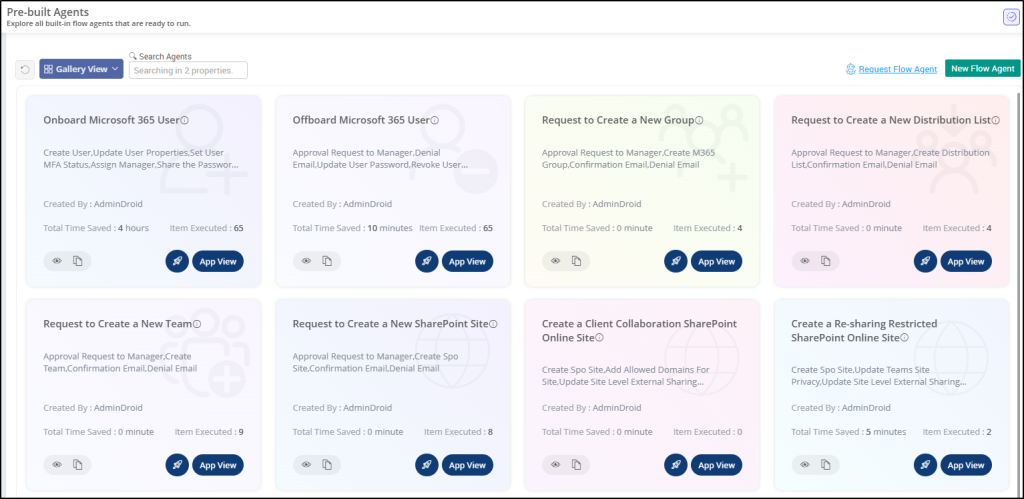
Admins can also clone existing workflows and reuse them for similar processes, making it easier to create and maintain recurring administrative workflows.
3. Keep Sensitive M365 Activities under Admin Approval
Some Microsoft 365 changes may require an additional review before they are executed.
Offboarding external users, creating a team, removing inactive guest users, changing sensitive policies, or making other impactful configuration changes may require another admin to review the request.
AdminDroid 365 supports approval workflows that allow sensitive M365 actions to require admin approval before execution. Flow agents can also incorporate approvals and maintain a history of decisions.
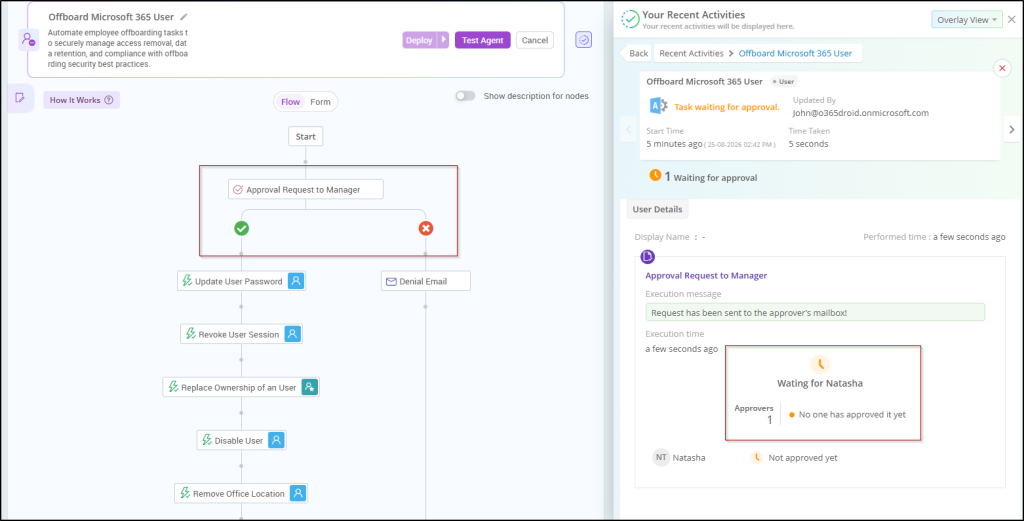
This can be useful when organizations want to introduce an additional checkpoint for crucial Microsoft 365 administrative operations.
4. Perform Bulk Microsoft 365 Admin Actions with More Control
Bulk changes can save significant time, but they also introduce risk if a mistake is applied to hundreds of Microsoft 365 accounts.
Imagine that 50 users need to be moved from the Marketing department to the Logistics department. As a result, admins will need to update the Department property for each user from “Marketing” to “Logistics”. Updating each user individually can be time-consuming and repetitive, especially when managing a large number of users.
With AdminDroid’s bulk management capabilities, admins can perform actions across multiple users and resources at once instead of repeating the same steps for each account. Admins can also pause and resume bulk executions, giving them more control when handling large-scale changes.
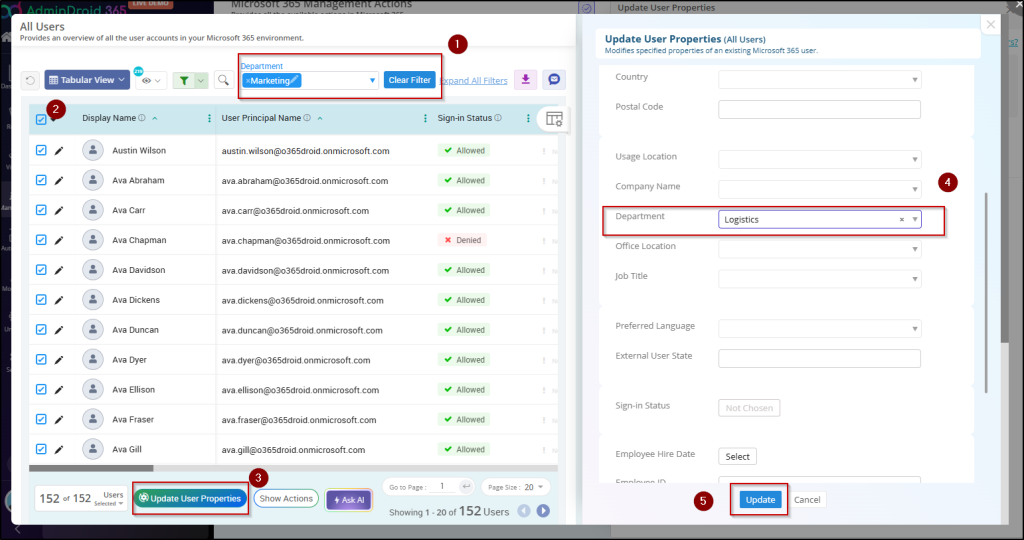
Whether it is updating account properties, managing licenses, or making other recurring changes, bulk Microsoft 365 management helps admins complete large-scale admin tasks more efficiently and consistently.
5. Delegate Microsoft 365 Administration with Right Level of Access
Not every admin needs unrestricted access to the entire Microsoft 365 environment.
- A helpdesk technician may only need to reset passwords but should not be allowed to change the password of a Global administrator.
- A Teams administrator may only need to manage Teams and channels.
- A reporting analyst may only need access to specific reports.
- A user admin may need access to specific users or groups without having permission to manage the entire tenant.
AdminDroid supports granular delegation, allowing organizations to delegate specific reports, resources, and management actions rather than giving every admin broader Microsoft 365 permission.
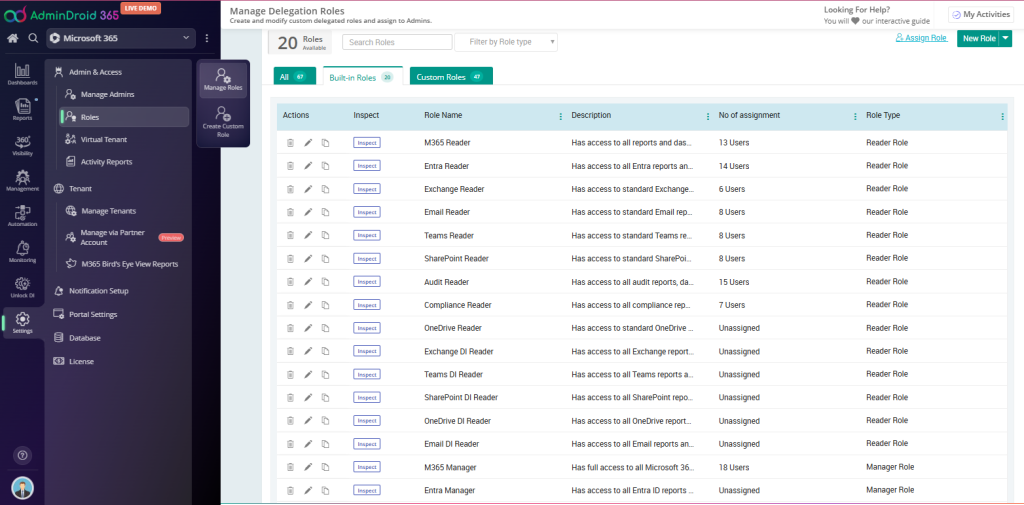
For organizations with different teams, departments, or administrative responsibilities, virtual tenants can provide another layer of granular delegation. Admins can also create virtual tenants based on their organization requirements and manage the resources within the appropriate scope.
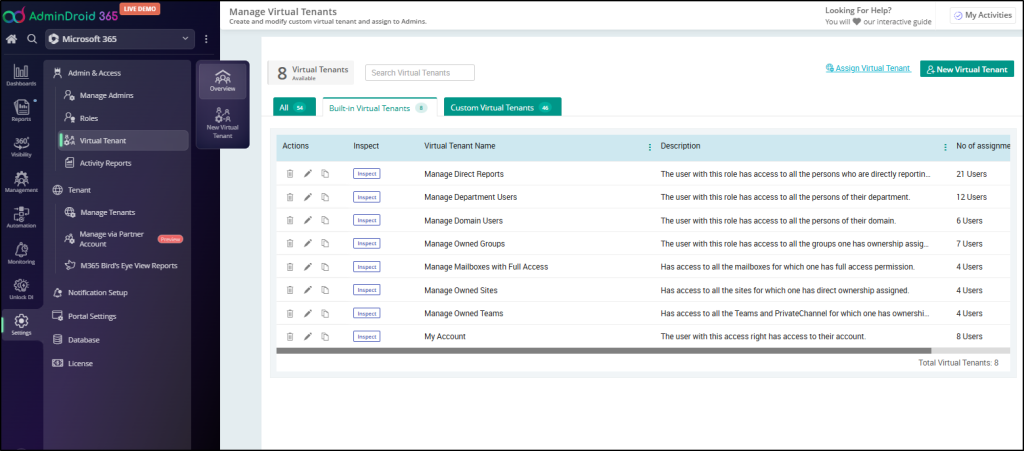
Together, granular delegation and virtual tenants help organizations give admins the access they need while keeping unrelated resources and sensitive administrative actions restricted. This makes delegation more aligned with the principle of giving admins the access they actually need.
6. Gain Complete Visibility with Microsoft 365 Reporting and Auditing
Microsoft 365 Management becomes more effective when admins have the flexibility of what requires right decisions.
For example, an admin may need to identify inactive users, review license usage, check group memberships, audit mailbox activity, view SharePoint permissions, examine external sharing, or investigate Teams’ activity. Having these insights readily available can make it easier to identify risks and take prompt decisions.
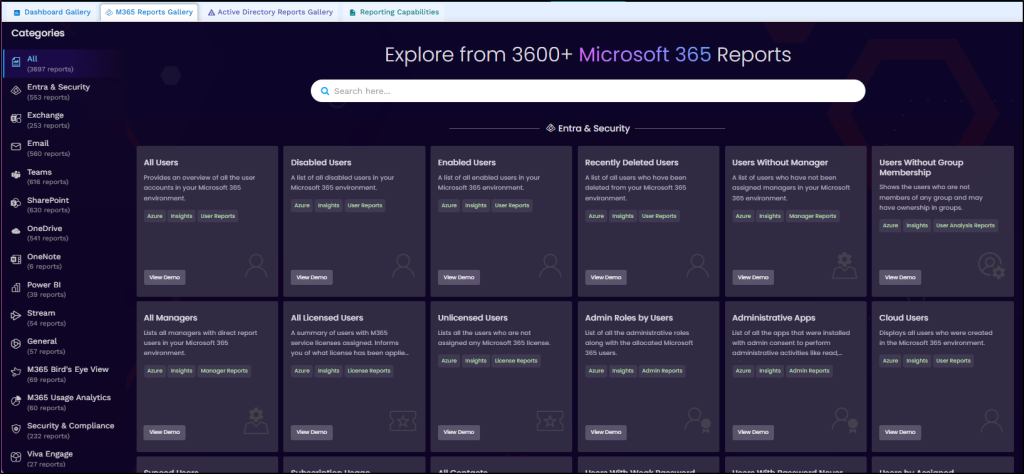
AdminDroid provides 3600+ Microsoft 365 insights and audit reports covering areas such as Entra ID, Exchange Online, Teams, SharePoint Online, OneDrive, security, and other Microsoft 365 services. Admins can filter and export reports, schedule them for regular delivery, and use report insights as a starting point for administrative workflows.
Along with reporting, AdminDroid M365 auditing reports adds another layer of visibility by helping admins investigate activities and changes across the Microsoft 365 environment.
Beyond reports, dashboards provide a visual overview of important Microsoft 365 data, helping admins monitor key metrics and trends without going through individual reports every time. You can explore the available report gallery and dashboard gallery to see the available insights.
7. Get Real-Time Alerts on Critical M365 Changes
M365 Management is not only about responding to requests. Admins also need to identify important changes before they become bigger risks.
For example, an admin may want to get alerted on elevation of admin privileges, unusual file deletions, external user additions, or another important event that occurs in the Microsoft 365 environment.
AdminDroid provides advanced alerting capabilities for Microsoft 365 activities along with ready-to-use alert policies. This allows admins to receive notifications when activities match their defined conditions, rather than having to continuously check for changes manually.
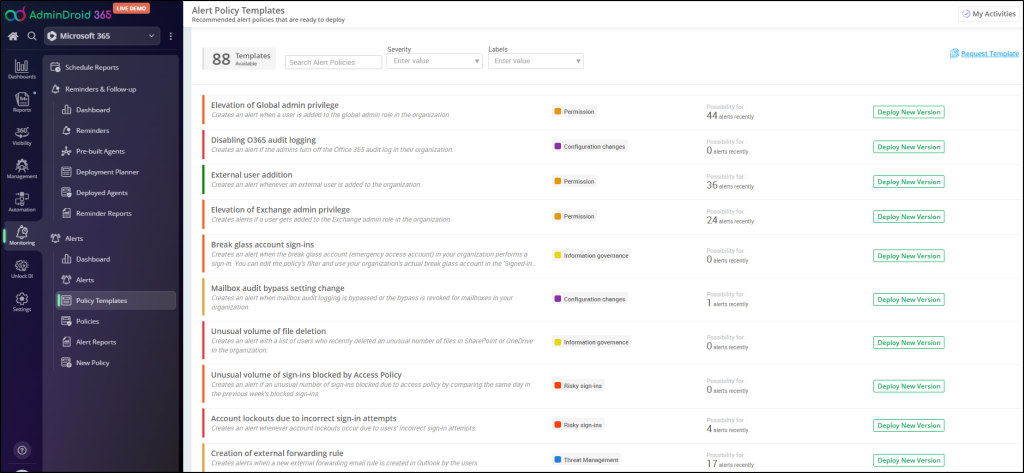
By bringing important changes to the admin’s attention as they happen, alerts can help teams respond to issues more quickly and stay aware of significant activity across the environment.
8. Stay on Top of Microsoft 365 Tasks with Reminders and Follow-ups
Some administrative tasks aren’t triggered by an immediate event. They need to be handled at a particular time or followed up after an earlier action.
For example, an admin may need to follow up on a Microsoft 365 user password expiry, license renewal, mailbox storage issue, or MFA-related action. Without a reminder, these tasks can easily be overlooked among other day-to-day responsibilities.
AdminDroid provides reminder and follow-up capabilities that help admins schedule these follow-ups and bring them to the right person’s attention at the appropriate time.
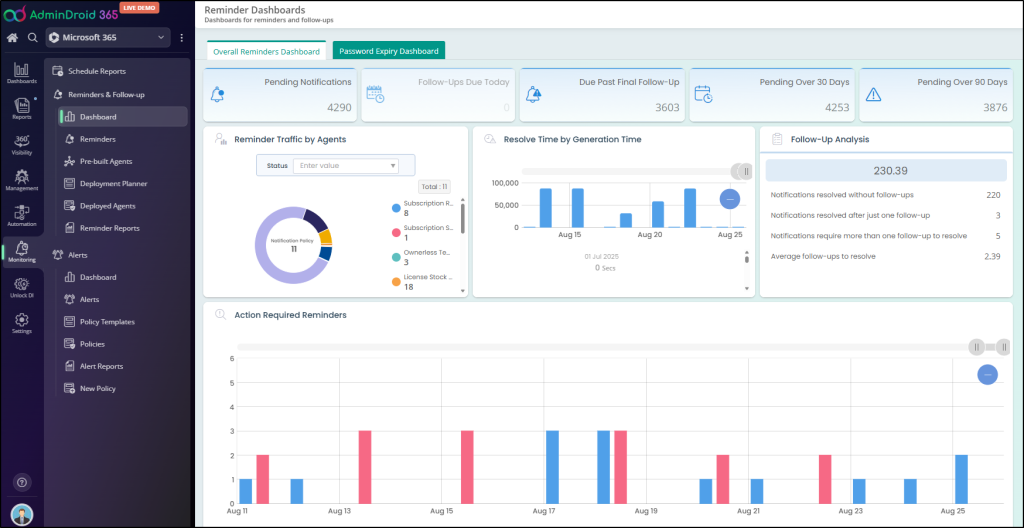
This can help admins stay on top of time-sensitive administrative tasks without having to rely entirely on memory or manual tracking.
9. Get 360-Degree Visibility into Microsoft 365 Environment
One of the biggest challenges in Microsoft 365 administration is connecting information from different services.
A user’s activity may span Entra ID, Exchange, Teams, SharePoint, and OneDrive. Similarly, a governance issue may involve several factors at once, such as permissions, external sharing, ownership, storage, and resource activity.
AdminDroid’s 360° visibility capabilities are designed to bring information about users and Microsoft 365 resources together, including activities, permissions, storage, ownership, and related administrative information.
Instead of treating each service as a separate administrative island, the admin can start from the resource or user and investigate across the entire environment.
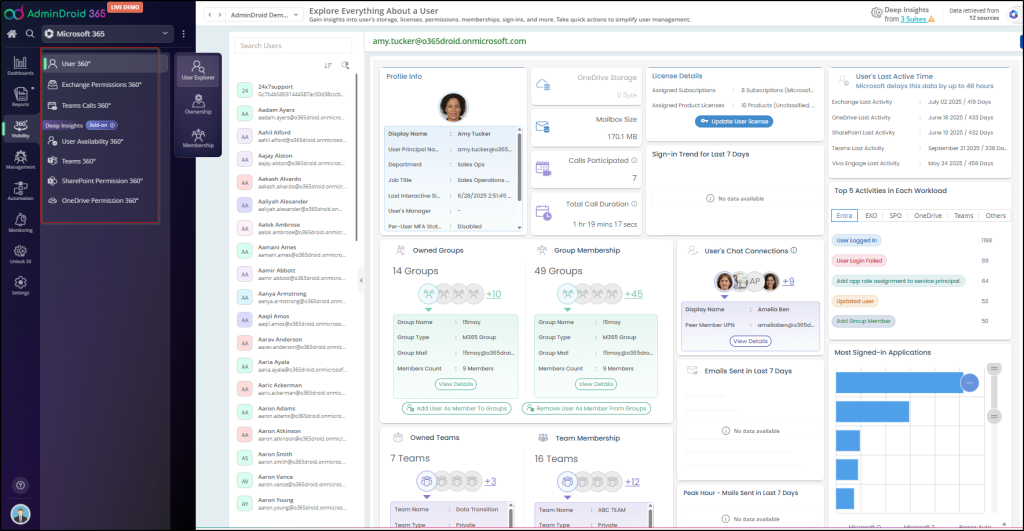
AdminDroid also provides Microsoft 365 governance portals that bring related insights together for areas such as threat analysis, SharePoint defense and governance, Exchange mailbox governance, and Teams governance. This gives admins a broader view when investigating resources and maintaining governance across the environment.
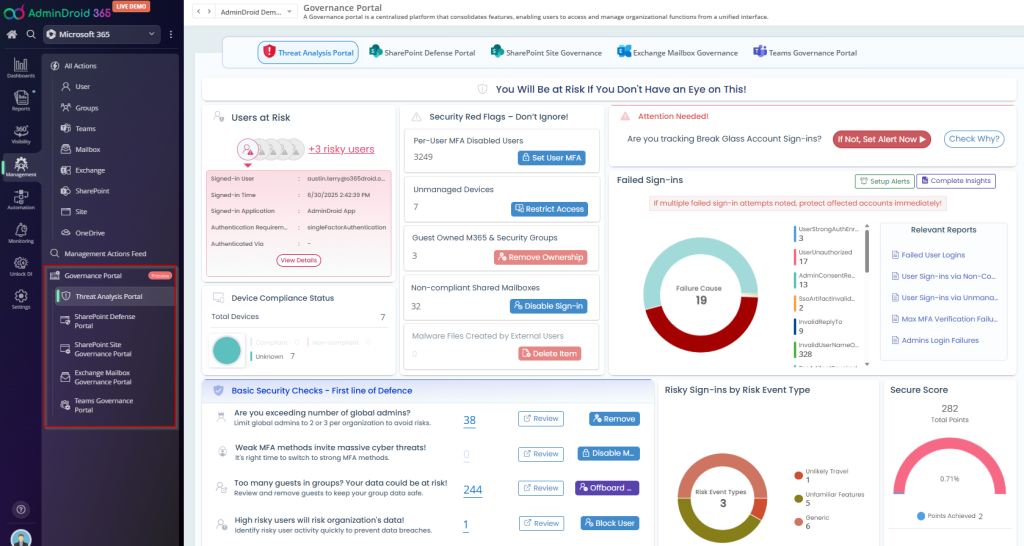
Together, AdminDroid brings these capabilities together to help admins address the key challenges of day-to-day Microsoft 365 management and maintain better control over their environment.
Try Microsoft 365 Reporting and Management for Free
Not every organization needs to start with a full-featured Microsoft 365 management platform. If you’re looking to explore centralized reporting and management without an upfront investment, AdminDroid offers a free Microsoft 365 reporting and management tool.
The Free Edition includes 60+ management actions, 120+ pre-built reports, real-time alerting, scheduled report delivery, report exports, rich filters, and interactive dashboards. It also provides lifetime access without a tenant-size limitation.
This can be a practical way for admins to start bringing everyday Microsoft 365 reporting and management activities together and evaluate how a centralized approach fits their environment.
Final Thoughts: Simplify the Way You Manage Microsoft 365
For organizations looking to simplify day-to-day Microsoft 365 administration, the real value of a management tool is therefore not simply the number of reports or actions it provides.
It is how effectively those capabilities help administrators find problems, make decisions, take action, and keep the Microsoft 365 environment under control.