As of now, admins are using PowerShell to export Teams reports, such as all teams report, channels report, members, and owners list. If you are familiar with PowerShell, handling cmdlets won’t be a challenge. But if you are a newbie, you should depend on a PowerShell script to export Teams reports.
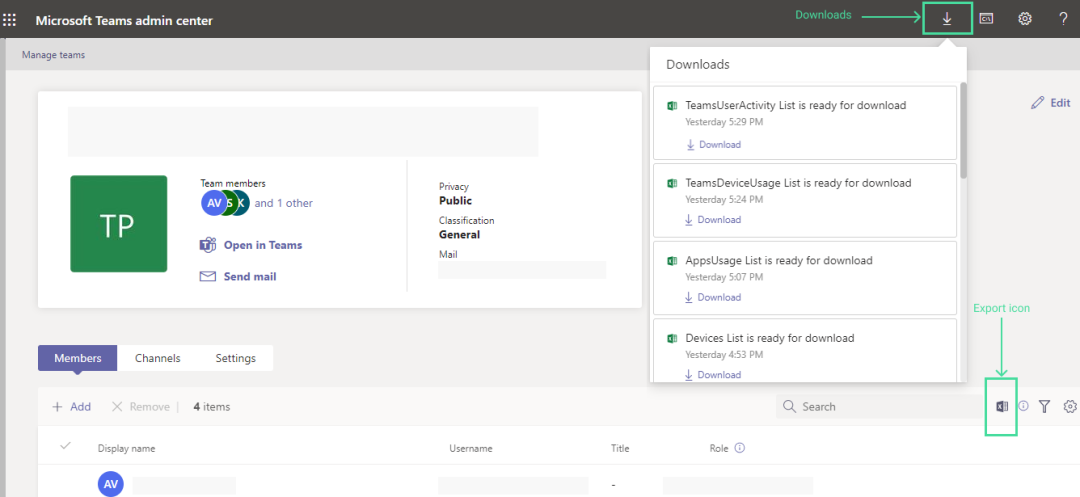
To overcome this difficulty, Microsoft has introduced the ‘Export Report’ option in the Microsoft Teams admin center. This will help admins to export Microsoft Teams report without PowerShell.
The feature allows admins to download the data from the following pages.
- Teams list page
- Channels list page
- Members list page
By clicking the ‘Export’ icon in the header, admins can export the report in the form of a CSV file.
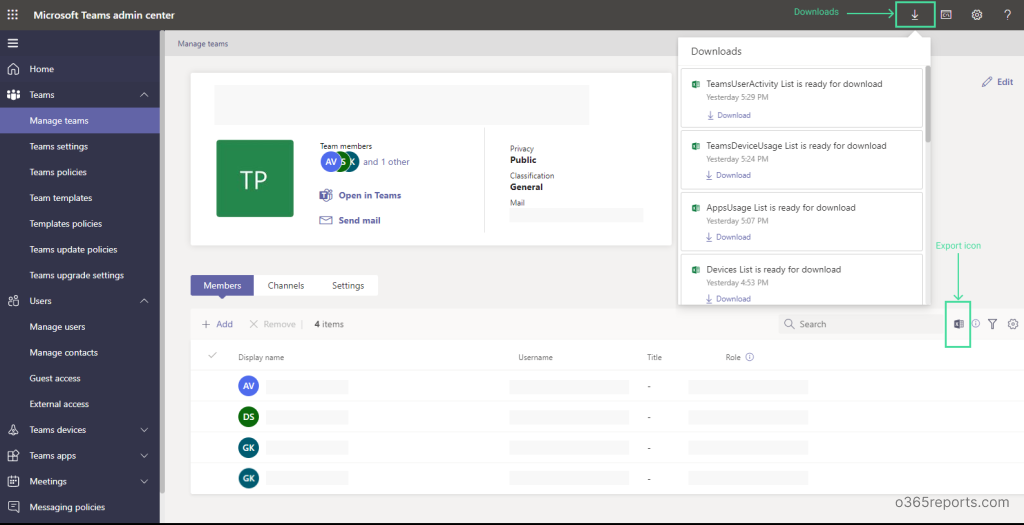
Highlights of ‘Export’ Feature:
- The download section shows the exported reports in the last 24 hours.
- Each admin has a personalized view. So, one admin cannot see the reports exported by other admins in their organization.
- Admins can apply a filter on these reports and export them instead of exporting all the items.
As per Message Center: MC337332, Microsoft is rolling out this feature in early March and expects to complete it by mid-March.
Isn’t it cool? Let’s see whether this UI option is flexible as PowerShell. Is it available in your tenant? Share your thoughts on this new feature in the comment section.