As administrators, we all know that every security mechanism has a weakness: A human error.
This applies to many security attacks and the famous one is Email phishing. In this technique, an imposter/hacker sends an email such that it is sent from someone we know/trust with malicious links and using them to steal sensitive data like passwords.
I know you will identify a phishing mail when Microsoft asks you to enter your password on random links. But, how about this one?
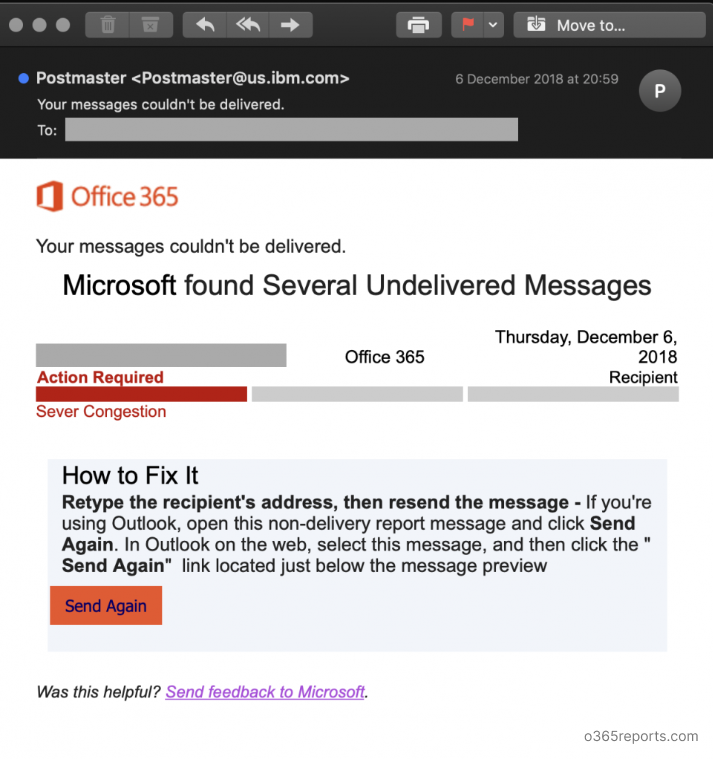
Image Credit: InfoSec
If I say this is a genuine delivery error by Office 365, many would believe. But sadly, it isn’t. The hacker has placed a Send Again button and trick you to resend an email which many would click.
Once clicked, you are taken to a website which exactly looks like Microsoft’s. As a trick, the hacker has enabled SSL certificate to their website which makes us skip reading the URL. Entering your password will easily share your complete Office 365 account with the hacker.
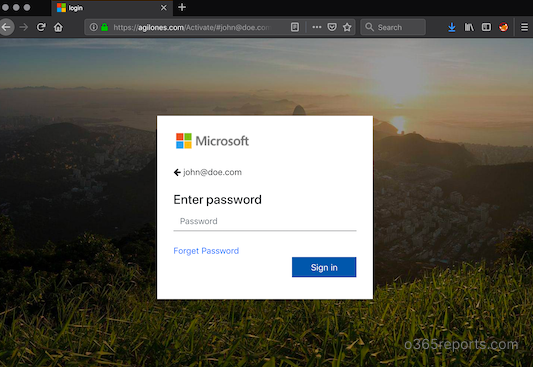
Image credit: InfoSec
After getting all the information, you will be taken to the genuine Microsoft website so that you don’t recognize what has happened before.
How to protect yourself?
- Do not click any links directly from anyone outside your organization. If you find any links, copy the URL and verify the host before opening it.
- If you find any informative links that usually doesn’t require you to sign-in, open them in In-Private/Incognito window.
- If the email is from inside your organization and not from a known associate, use caution and follow the procedures considering it as external.
- If someone you know asks for some sensitive information in the email, make sure to contact them personally by calling so that you can make sure it is not the hacker emailing from your associate’s account. Hackers usually hack the weakest account in an organization and use them to exploit other employees.
- To stay prepared, undertake an attack simulation training. It helps you understand the various forms of phishing attacks so you can recognize threats and better protect your sensitive information from compromise.
Some of the other most common phishing methods are:
- Sending you a password expiry email and asking you to enter your old and new password.
- Asking you to try out a new feature in Office 365 applications by signing in using the link in the email.
Hope I gave you some tips. Merry Christmas in Advance!