Groups in Microsoft 365 have evolved into a critical control plane for collaboration and access management. However, many organizations still lack continuous visibility into the health and governance state of these groups. Common risks, including orphaned groups, missing sensitivity labels, and unmanaged external membership, often remain hidden until they become operational or security concerns.
Traditionally, uncovering these issues has required custom scripting, Microsoft Graph queries, and periodic manual audits, making proactive governance difficult to sustain at scale. As group creation continues to accelerate across Teams, SharePoint, and other Microsoft 365 services, the need for built-in, continuous visibility has become increasingly clear.
This is why Microsoft’s silent introduction of Group Insights (Preview) in Microsoft Entra ID represents a meaningful step forward. In this blog, we’ll take a closer look at what Group Insights in Microsoft Entra ID offers and how it can strengthen your Microsoft 365 group governance.
Hidden Risks of Microsoft 365 Group Sprawl
As group types in Microsoft 365 are so easy to create, and often created automatically by workloads, they tend to grow rapidly. What begins as a controlled structure can, over time, become an organically grown web of permissions that few teams fully understand. This is where many organizations begin to struggle to properly manage groups at a scale. Common problems include:
- Group ownership is not always updated when employees change roles or leave the company,
- Dynamic group membership rules become increasingly complex as they are reused and modified,
- Sensitivity labels may be enabled but applied inconsistently, and
- Guest users sometimes remain in groups far longer than originally intended.
Individually, these issues may seem manageable. Collectively, they introduce standing access risk and make governance efforts more difficult to sustain. This is the operational gap that Group Insights in Microsoft Entra is designed to address.
What is Inside Groups Insights (Preview) in Entra ID?
Group Insights provides a consolidated governance dashboard that surfaces risk indicators and hygiene gaps across your tenant’s groups in near real time. Rather than forcing administrators to hunt for problems, the feature proactively highlights where attention is needed. Group Insights is available to users with appropriate directory roles, such as Global Administrator, Security Administrator, Groups Administrator, Identity Governance Administrator, and Reports Reader.
You can access Group Insights dashboard in the Microsoft Entra admin center by navigating to:
Microsoft Entra admin center → Groups → Insights (Preview)
Below is a closer examination of its core focus areas:
- Group ownership insights
- Dynamic group membership rule complexity
- Group lifecycle management
- Group security and compliance
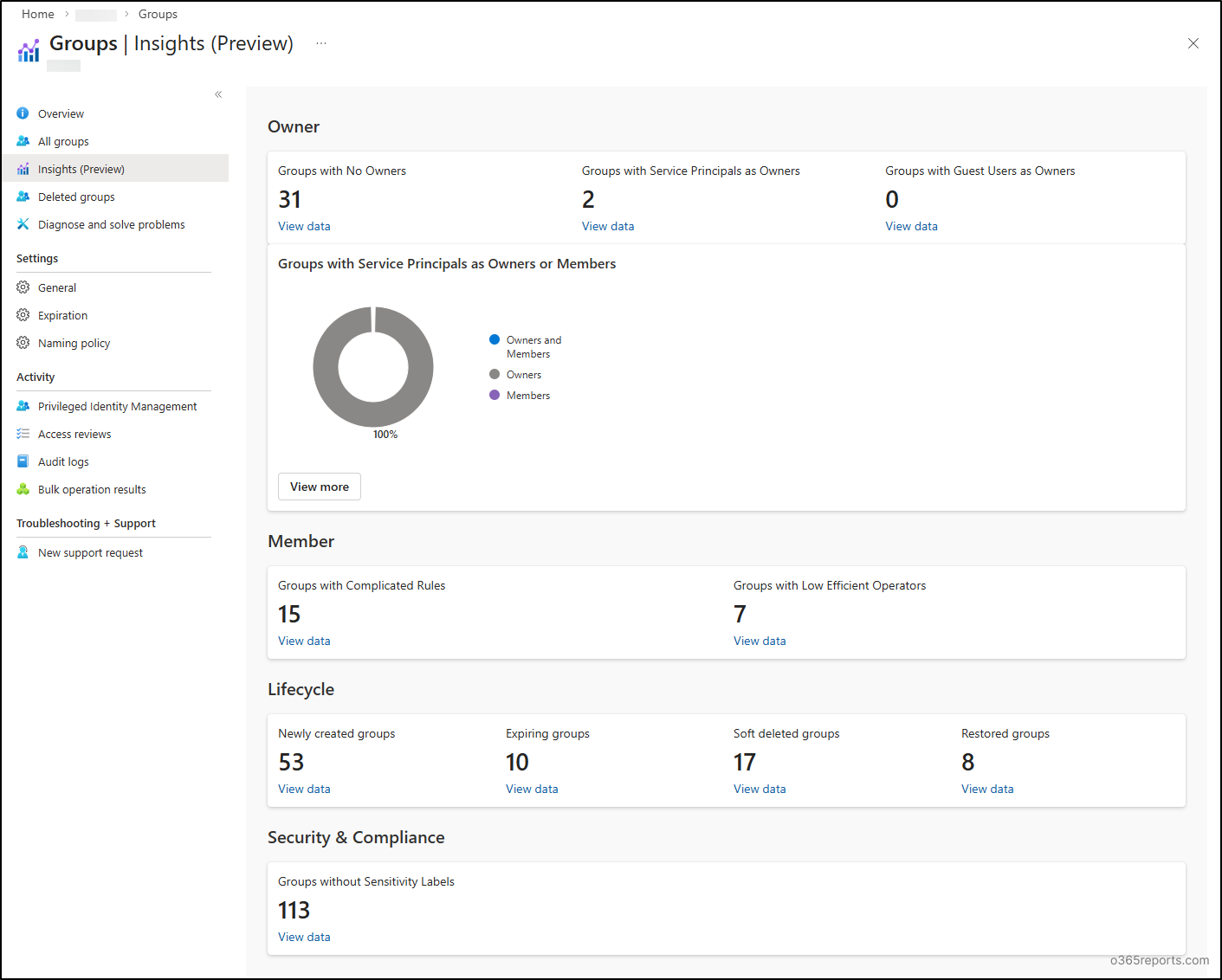
1. Group Ownership Insights
While the Microsoft 365 admin center does provide filters to identify ownerless groups, the visibility is not fully comprehensive. Native views primarily surface ownerless Microsoft 365 groups and do not offer a unified way to enumerate ownerless security groups or distribution lists at scale.
This creates gaps in tenant-wide ownership hygiene and often pushes administrators toward PowerShell scripts or custom reporting to obtain a complete picture. Group Insights helps address this fragmentation by bringing:
- Groups with no owners
- Groups with service principals as owners
- Groups with service principals as members
- Groups owned by guest users
Each of these scenarios introduces risk. Groups without owners can quickly become unmanaged access points, while service principal ownership may lack proper human oversight. Guest ownership can also expose control to external users when it is not intended.
The real strength of this capability lies in its speed. Administrators can quickly drill into affected groups and begin remediation. What once required scripts and manual effort now takes only a few clicks.
2. Dynamic Group Membership Rule Complexity
Microsoft dynamic groups are one of Entra ID’s most powerful capabilities, but they can also become one of the least understood over time. As rules evolve, admins often encounter deeply nested logic, legacy attribute dependencies, performance-impacting conditions, and rules that few team members can confidently interpret.
To simplify this, Group Insights provide immediate visibility into:
- Groups with complex membership rules: Dynamic groups where membership logic exceeds 10 expressions, often indicating higher maintenance overhead.
- Groups with potentially inefficient processing logic: Dynamic groups leveraging ‘contains’ or ‘match’ operators that can introduce processing inefficiencies at scale.
This level of insight is especially valuable in large enterprises where dynamic groups drive application access or licensing automation. By identifying rule complexity early, teams can reduce the risk of unexpected membership changes, licensing misalignment, and performance issues across large tenants.
3. Group Lifecycle Management
Managing the group lifecycle consistently remains a challenge for many organizations. Even when policies exist, visibility into group creation, expiration, and cleanup is often fragmented.
Group Insights delivers lifecycle telemetry over a rolling 30-day window, covering:
- Newly created groups
- Groups approaching expiration
- Soft-deleted groups
- Recently restored groups
This enables administrators to detect unusual patterns such as sudden spikes in group creation, repeated restoring groups activity, and expiration policies that are enabled but ineffective. For organizations pursuing Zero Trust model, this level of continuous lifecycle awareness is extremely useful.
4. Group Security And Compliance
Sensitivity labels are central to Microsoft 365 governance, as they support data classification, external sharing controls, and compliance requirements.
In practice, however, consistency is where many organizations struggle. Labels are often enabled but not uniformly applied across collaboration groups.
Group Insights directly targets this gap by highlighting groups without sensitivity labels. While simple in concept, this visibility can significantly accelerate governance improvements and reduce audit preparation effort.
What makes Group Insights noteworthy is not just the individual signals it surfaces, but the broader operational shift it enables!
🚩 While the Group Insights dashboard delivers valuable visibility, the current preview experience does have a small usability limitation. In several views, the Group ID is displayed instead of the Group Name, which can make quick identification difficult. Administrators often need to click into the entry and manually correlate the ID to determine the actual group.
That said, since the feature is still in preview, this appears to be more of an early-stage UX gap. It is reasonable to expect improvements in the production rollout to make group identification more intuitive.
For administrators who have long recognized group sprawl as a quiet but persistent risk, this feature provides a much more practical way to monitor and manage group health. Feel free to reach us through the comments section if you have any questions.